react-native-mapsでgoogle mapのスタイルを試してみた
概要
以下のリンクを見た際、スタイルが変わった模様 Google Maps Platform のドキュメント | Maps SDK for Android | Google for Developers
以下のような感じに変わる模様

実際にブラウザ上も変わっているようです。

どのようにしたら出るのか不明のため。実験
環境
npx @react-native-community/cli@latest init TestApp
react-native-mapsを追加
package.json
{
  "name": "TestApp",
  "version": "0.0.1",
  "private": true,
  "scripts": {
    "android": "react-native run-android",
    "ios": "react-native run-ios",
    "lint": "eslint .",
    "start": "react-native start",
    "test": "jest"
  },
  "dependencies": {
    "react": "18.3.1",
    "react-native": "0.77.0",
    "react-native-maps": "^1.20.1"
  },
  "devDependencies": {
    "@babel/core": "^7.25.2",
    "@babel/preset-env": "^7.25.3",
    "@babel/runtime": "^7.25.0",
    "@react-native-community/cli": "15.0.1",
    "@react-native-community/cli-platform-android": "15.0.1",
    "@react-native-community/cli-platform-ios": "15.0.1",
    "@react-native/babel-preset": "0.77.0",
    "@react-native/eslint-config": "0.77.0",
    "@react-native/metro-config": "0.77.0",
    "@react-native/typescript-config": "0.77.0",
    "@types/jest": "^29.5.13",
    "@types/react": "^18.2.6",
    "@types/react-test-renderer": "^18.0.0",
    "eslint": "^8.19.0",
    "jest": "^29.6.3",
    "prettier": "2.8.8",
    "react-test-renderer": "18.3.1",
    "typescript": "5.0.4"
  },
  "engines": {
    "node": ">=18"
  }
}
App.tsx
/**
 * Sample React Native App
 * https://github.com/facebook/react-native
 *
 * @format
 */

import React from 'react';
import type {} from 'react';
import {
  SafeAreaView,
  StatusBar,
  StyleSheet,
  useColorScheme,
  View,
} from 'react-native';

import {Colors} from 'react-native/Libraries/NewAppScreen';

import MapView, {PROVIDER_GOOGLE} from 'react-native-maps';

/*
 * react-native-mapsで地図を表示
 */
function App(): React.JSX.Element {
  const isDarkMode = useColorScheme() === 'dark';

  const backgroundStyle = {
    backgroundColor: isDarkMode ? Colors.darker : Colors.lighter,
  };

  return (
    <SafeAreaView style={backgroundStyle}>
      <StatusBar
        barStyle={isDarkMode ? 'light-content' : 'dark-content'}
        backgroundColor={backgroundStyle.backgroundColor}
      />
      <View style={styles.container}>
        <MapView
          provider={PROVIDER_GOOGLE}
          style={styles.map}
          region={{
            latitude: 35.6714183,
            longitude: 139.7767189,
            latitudeDelta: 0.013,
            longitudeDelta: 0.013,
          }}></MapView>
      </View>
    </SafeAreaView>
  );
}

const styles = StyleSheet.create({
  container: {
    ...StyleSheet.absoluteFillObject,
    height: 600,
    width: 400,
    justifyContent: 'flex-end',
    alignItems: 'center',
  },
  map: {
    ...StyleSheet.absoluteFillObject,
  },
});

export default App;
鍵発行
鍵を発行して設定を行う

AndroidManifest.xml
      <meta-data
        android:name="com.google.android.geo.API_KEY"
        android:value="Googleコンソール経由で発行したSDK用のAPIキー"/>
実験
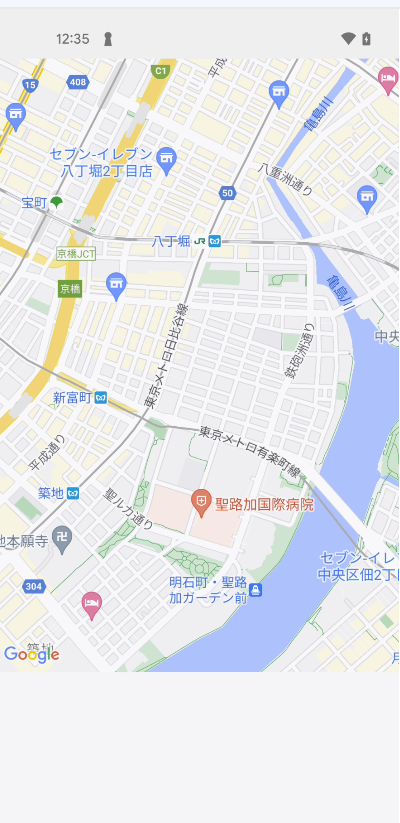
変わらない・・・
地図のスタイルを設定する必要がある模様
地図のスタイル
新規作成してからマップの表示や配色の設定ができるみたい

↓

↓
スタイルを設定して保存・公開


↓
MAPIDを新規追加

↓

↓

↓
地図の下イルを設定

↓

↓

MapViewにMapIDを設定
      <View style={styles.container}>
        <MapView
          provider={PROVIDER_GOOGLE}
          style={styles.map}
          googleMapId="ここにMAP IDを設定"
          region={{
            latitude: 35.6714183,
            longitude: 139.7767189,
            latitudeDelta: 0.013,
            longitudeDelta: 0.013,
          }}></MapView>
      </View>
↓
適用された模様
| 前 | 後 |
|---|---|
| |
 |
